

科技 PM 告別加班!一週省下 6 小時的 AI 工作流
一個典型的科技 PM如何擠出時間。。。

我的每週的時間大概長這樣:
會議:10 - 15 小時。一天 3-5 場是常態。
會議記錄整理: 3-4 小時。開完會還要花時間把筆記變成人看得懂的東西。
PRD / 策略文件: 2 -3 小時。從空白頁開始,痛苦地擠出第一版。
週報 :30 分鐘- 1小時。週五下午靠記憶拼湊這週到底做了什麼。
加起來,光這些「行政工作」就吃掉每週 20 - 25 小時。真正需要判斷力的產品決策、策略思考?被擠到To do list 的最後。
我以前每週花 4 小時以上在這些雜事上(還不算那些開不完的會)。上週我做了個實驗,把這些事一個一個丟給 AI。七天後省了 5-6 小時。
以下是四個做法,每個都附 step-by-step 設定教學和可以直接複製的 prompt:
週一Weekly briefing — 用 Claude + Google Calendar 自動產出這個星期你有什麼重要會議及行程
會議即時記錄 — 用 Gemini 即時產出 action items
Product brief/ Strategy doc 60% 初稿 — 用 Claude Skill 產 PRD 和策略文件
自動化週報 — 用會議記錄直接生成 weekly update
Let’s GO!
週一Weekly briefing
避免自己的週一早上在焦慮中開始,我會叫Claude 幫我準備一周的行事曆,他就像我的行政助理。當你看到行事曆塞滿了 backlog refinement、stakeholder sync、跨團隊會議,但你搞不清楚哪場最重要、哪場要先準備什麼。這個時候你可以用AI作為你的助手。
我把 Claude 接上 Google Calendar,讓它每週一幫我做一份Weekly briefing 。從「被動參加會議」變成「主動控場」。
怎麼設定(Step-by-step)
打開 Claude Desktop App,進入 Cowork 模式
點左下角的「Connect」,選 Google Calendar
授權你的 Google 帳號,讓 Claude 讀取行事曆
每週一早上,貼上以下 prompt
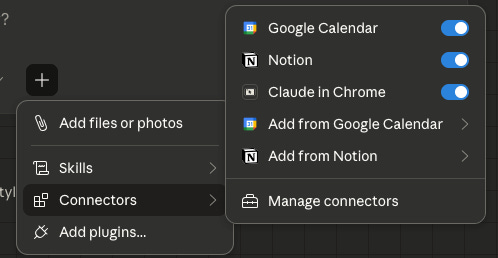
Prompt(直接複製)
Analyze my Google Calendar for this week (Monday to Friday) and generate a strategic weekly brief. For each meeting, provide:
Who — Key stakeholders and their roles
What — A one-sentence summary of the objective
Why — The strategic importance and what preparation or data I need to bring
Sort by date. If a day has more than 3 meetings, highlight the Priority session. End with a 3-sentence executive summary of my focus areas for the week.
實際產出長這樣
AI 會告訴你:「週三下午跟 Data Team 的會最重要——這場決定 Q3 指標定義。建議先把上次 A/B test 的數據備好。」
你不再花 30 分鐘回想每場會議的脈絡。打開 brief,直接進入狀態。
會議即時記錄
會議裡最有價值的東西,在散會後 10 分鐘開始蒸發。誰負責什麼、什麼時候交、當場做了什麼決定,這些細節消失得很快。
我用 Gemini 解決這件事。會一開完,記錄就在那裡。
怎麼用 Gemini(Step-by-step)
開會前,在 Google Meet 裡開啟錄音(或用 Otter.ai 等錄音工具)
會議結束後,把錄音檔上傳到 Gemini(直接拖進對話框)
貼上以下 prompt,Gemini 會處理長音檔,把整場會議拆解成結構化的記錄
Prompt(直接複製)
Based on the provided meeting transcript, organize the information into this structured format:
Summary: A high-level overview in 3 sentences or less.
Key Decisions: List every decision made, including the rationale and the owner.
Action Items: [Owner] - [Task Description] - [Deadline/Priority]
Unresolved Issues: List questions or blockers that require follow-up.
Use a direct, professional tone. Avoid fluff or polite filler phrases.
實際產出長這樣
AI 不會寫「大家討論了 UI 的顏色」。它會寫:「決策:為提升轉化率,採用版本 B。Action Item:設計師XX 需在週四前更新 Mockup。」
節省15 分鐘的整理時間!
告別空白頁:PRD 與策略初稿
寫 PRD 最痛的地方是從 0 到 1。盯著空白頁,不知道從哪裡開始。
但 80% 的 PRD 結構是固定的:問題描述、目標、User Stories、技術方案。這些可以模組化。你真正該花時間的是那 20%: 權衡取捨跟複雜邏輯。
我的做法:在 Claude 裡建一個 Skill,把團隊的 PRD 格式寫成一套可重複使用的指令集。以後每次寫 PRD,Claude 自動套用你的格式跟標準,不用每次重新解釋。
什麼是 Claude Skill
Skill 是你幫 Claude 寫的一份「工作手冊」。你把格式、架構、檢查清單寫成一個 SKILL.md 檔案,存在 Claude 的 skills 資料夾裡。之後只要你說「幫我寫 PRD」,Claude 就會自動讀取這份手冊來執行。
怎麼建 Product Brief Skill(Step-by-step)
打開 Claude Desktop App,進入 Cowork 模式
跟 Claude 說:「幫我建一個 Product Brief 的 Skill」
把你團隊的 PRD 模板、常用架構、review checklist 貼給它
Claude 會生成一個 SKILL.md 檔案,存在你的 skills 資料夾
之後每次要寫 PRD,直接丟需求背景,Claude 會自動套用你的格式產出初稿
